


Replit: Vibe Code with AI Fast
4.51.79K Reviews
App Specs
- Version
- 2.197.4
- Updated On
- License
- Free
- Downloads
- 5,000,000+
- Developer
- Replit
- Categories
- Productivity
- Platform
- Android, iOS
Screenshots


 Analysis by AppCompare
I often think of Replit as a way to turn a small idea into something I can test, rather than as a replacement for a full computer-based development setup. That distinction matters if you are deciding whether it belongs on a phone or tablet used by several people at home. One person might want to make a simple tool for a shared chore, while someone else may be learning how code works; both can benefit, but they should treat projects and accounts as their own rather than assuming the app is built around household sharing.
A shared-device idea, with individual projects
Picture a family member sketching out a basic packing checklist before a trip, then asking a child who is curious about coding to help turn it into a small working project. Replit can make that kind of experiment feel approachable: you can start with a concrete problem, make changes, and see how a coding project develops. I would use a shared device for a short, supervised session like this, but I would keep each person’s work and sign-in decisions separate. A shared screen does not mean every project should be treated as a shared account or shared responsibility.
That boundary is useful for adults sharing a tablet with a partner or housemate, too. If you are testing an idea together, agree on who is making changes and where the project belongs before you begin. It avoids the everyday confusion of one person editing another person’s work or assuming a project will be easy to hand over later. Replit’s collaborative setting can help when people deliberately work together, but I would not confuse collaboration with a general-purpose family profile or automatic household organization.
Set expectations before the first prompt
For a beginner, the easiest way to get value is to bring a small, specific task instead of asking the app to produce an entire polished product at once. A household example could be a simple list that sorts errands by person, or a tiny page that displays a week’s meal ideas. Start by describing what the project should do, then check the result in small steps. When something behaves unexpectedly, ask what part of the code is responsible and make one change at a time. That workflow teaches more than repeatedly requesting a complete rewrite.
I also recommend deciding what “finished” means before experimenting. A prototype that works for one person’s own planning is different from a dependable tool everyone in a household will rely on. Before sharing a project, test the main path yourself, check that the labels make sense to someone who did not build it, and keep a simple fallback such as a notes app or paper list. That is not a criticism of Replit; it is a sensible limit for any quickly built personal tool.
Coordination works best when the task is clear
Collaborative coding is most useful when each person has a defined contribution. One person can describe the problem and test whether the result is helpful, while another makes a focused code change. If several people edit without agreeing on the next step, the convenience of working together can turn into a muddle. I would use a shared session for brainstorming, reviewing a small change, or helping a learner understand an error, then pause to check that the project still does what the group intended.
For everyday household planning, a dedicated shared calendar, checklist, or notes tool is usually the better choice if the goal is simply to coordinate chores or appointments. Replit is the more interesting option when the household wants to build or learn from a custom solution. That difference is easy to miss: this is a productivity app for making and working on software, not a ready-made home organizer. If the task is only “tell everyone what to buy,” a familiar list app takes less effort and needs no coding detour.
Worth Reading Before You Choose

Flipboard Shows What News Apps Must Do Beyond the Feed

Switching to Android Auto Means Rethinking Your Driving Routine

Google Calendar Makes a Crowded Week Easier to Manage

Ludo King Makes the Most of the Minutes Between Plans

Baby Panda World Brings Quick Play to Modern Phones, but Its Game Library Feels Busy

ESPN’s Live Game View Makes Following Close Games Easier
Age, trust, and a realistic role for adults
The app is rated for Everyone, and that makes it broadly accessible, but an age label does not replace an adult’s judgment about how a child uses a coding environment. I would sit alongside a younger learner at first, help them understand what they are building, and remind them not to put private household details into a project just because it is convenient. The useful lesson is not only how to make a feature work; it is also how to think carefully about what information a homemade tool should contain.
For teens and adults, the same principle applies in a less hands-on way. Treat AI-generated code as a draft that deserves inspection, not as proof that a project is safe, correct, or ready for other people. A tool that handles a family schedule or personal information deserves more care than a playful demonstration. If you would not be comfortable troubleshooting the project or explaining how it works, keep it as an experiment rather than making it part of an important routine.
Replit is a free productivity app from Replit, with in-app purchases listed from about $26 to $260 per item. Its average rating is 4.5 from around 24,000 ratings, and it has been installed over 5 million times. It is rated for Everyone; the release date is October 14, 2022, and version 2.173.0 lists Android 7.0 as the minimum operating system. Those details make it easy to place the app, but the right choice still depends on whether you want to build software or simply get an ordinary household task done.
Turning an idea into a useful project
Hey there! So, I recently got my hands on the Replit: Build apps with AI app, and I’ve got to say, it’s been quite a ride. If you’re someone who’s into app development or just curious about AI, this might just be your new best friend. Let me walk you through my experience with it.
Getting Started with Replit
First things first, downloading the app was a breeze. Available on both Android and iOS, it took just a few taps, and I was ready to dive in. The app is designed with a sleek interface, making it super user-friendly even if you’re not a tech whiz. It welcomes you with a clean dashboard, and everything is pretty much self-explanatory.
Exploring the Features
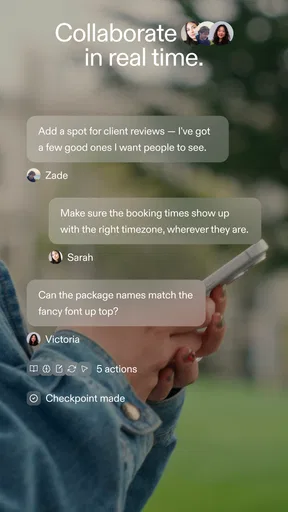
Now, onto the juicy stuff. Replit offers a ton of features that make coding and app development accessible to everyone. One of the standout features is definitely the collaborative coding environment. You can work on projects with friends or colleagues in real time, which is super handy if you’re working on group assignments or team projects.
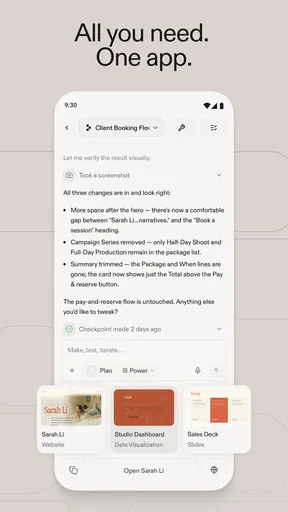
Another thing that caught my eye was their AI-powered coding assistant. It’s like having a little genius in your pocket, ready to help out whenever you’re stuck. The AI suggests code completions, helps debug, and even provides explanations for complex code snippets. It’s like having a coding buddy 24/7!
Customizable and Versatile
What’s also great about Replit is its versatility. It supports over 50 programming languages, so whether you’re into Python, JavaScript, or even something more niche, you’re covered. Plus, the app allows you to deploy apps straight from your phone, which is a game-changer for developers on the go.
The customization options are pretty neat too. You can tweak the editor’s theme, font size, and layout to fit your style. It’s the little things that make a big difference when you’re staring at code for hours.
Use it as a workbench, not a magic button
My most practical tip is to keep the first project deliberately small. A personal calculator, a short quiz, or a page that organizes a few ideas gives you a manageable way to learn how the editor, assistant, and project fit together. On a phone, the smaller screen makes long edits and tracing several files less comfortable than on a computer. I find that a mobile session is best for sketching an idea, fixing a focused issue, or checking a result; for a bigger build, a larger screen is easier to work with.
The assistant can reduce the intimidation of a blank page, but I would not accept its suggestions without reading them. Ask it to explain a change in plain language, then test the result and compare it with what you expected. This is especially helpful when a project appears to work but you are unsure why. The trade-off is that leaning on generated code too heavily can leave a beginner with something they cannot maintain. If your goal is to learn, use the assistant to clarify and guide, not only to produce.
Compared with a traditional code editor, Replit’s appeal is its more approachable, connected workflow and its AI help; a conventional desktop setup may still feel better when you need precise control over a large project or prefer to manage every part of your toolchain yourself. Compared with a no-code builder, Replit gives you a path into actual code, which is useful if you want to understand or change how a project works. A no-code option is often more direct when you only need a standard form or simple landing page and have no interest in learning programming.
The Learning Curve
For beginners, there’s a slight learning curve, but nothing too daunting. The app includes tutorials and a community forum where you can ask questions and share knowledge. It’s a great way to learn and grow as a developer, especially if you’re just starting out.
And if you’re an experienced coder, you’ll appreciate the advanced features and the flexibility the platform offers. It’s a perfect blend of simplicity and complexity, catering to all skill levels.
Still, I would not describe coding as effortless just because an AI assistant is available. You need to recognize when the app has misunderstood your goal, decide whether an error matters, and be willing to iterate. A beginner who enjoys experimenting will likely find that process rewarding. Someone who wants a finished app immediately, without reviewing or adjusting anything, may find the gap between an idea and a dependable result frustrating.
Who gets the most from it
I think Replit is a strong fit for curious learners, hobbyists, and people who want to test a software idea without starting with a complicated local setup. It can also suit a small group working on a class exercise or a lightweight prototype, provided everyone agrees on the project and communicates about edits. For a household, the best use is an optional learning activity or a custom experiment—not a replacement for a mature tool that manages important schedules, records, or responsibilities.
I would skip it if your main need is ordinary note-taking, shared shopping lists, or reliable family coordination with no interest in building anything. I would also choose a computer-based development environment when a project becomes large enough that phone editing slows you down, or when you need a workflow you can inspect and control in more depth. Replit’s strength is lowering the barrier to trying code; that does not make every coding task a good fit for a mobile device.
Final Thoughts
Overall, Replit: Build apps with AI is a powerhouse for anyone interested in coding and app development. Whether you’re a newbie looking to learn or a seasoned developer wanting to streamline your workflow, this app has something for everyone. The AI assistant alone is worth giving it a shot. It’s like having a personal mentor guiding you through the coding jungle.
So, if you’re ready to take your coding skills to the next level, definitely check out Replit. You might just find it’s the sidekick you never knew you needed. Happy coding!
My household verdict is that it is worth trying when someone at home genuinely wants to make or understand a small piece of software. Keep accounts and project ownership clear, supervise younger users in a way that suits your family, and avoid putting sensitive details into casual experiments. For a shared-device session, agree on who is editing and make a copy or pause before handing the work to someone else. With those boundaries, Replit can turn a passing idea into a useful learning project; without them, a simpler shared app or a full-size computer may be the more comfortable choice.
Pros
- Intuitive interface for beginners.
- Seamless collaboration features.
- Supports multiple programming languages.
- Built-in AI assistance enhances coding.
- Cloud-based
- no local storage needed.
Cons
- Limited offline functionality.
- Can be slow with large projects.
- Free version has restricted features.
- Occasional AI-generated errors.
- Mobile app lacks some desktop features.
FAQs for Replit: Vibe Code with AI Fast
What platforms are supported by Replit for app development?
Replit supports development on both Android and iOS platforms, making it versatile for users looking to create apps for either mobile operating system. The platform offers a seamless experience with rich features that cater to developers at various levels, whether they are beginners or experienced professionals.
Is Replit suitable for beginners in app development?
Yes, Replit is highly suitable for beginners due to its user-friendly interface and comprehensive tutorials. The platform provides step-by-step guidance and resources, making it easier for new developers to get started with coding and building apps. Even those with minimal programming experience can take advantage of its intuitive tools.
How does Replit incorporate AI into app development?
Replit utilizes AI to enhance the development process by offering intelligent code suggestions and error detection. This AI integration helps streamline coding, allowing developers to focus more on creativity and functionality. The AI features are designed to improve productivity and reduce the time spent on debugging.
What are the key features of Replit that aid in app building?
Replit offers several key features such as collaborative coding, a built-in code editor, and a wide range of programming languages. It also includes version control and deployment tools, making it a comprehensive platform for app development. These features are designed to simplify and accelerate the development process.
Are there any costs associated with using Replit?
Replit offers both free and paid plans, catering to different user needs. The free plan provides access to basic features, which is sufficient for many developers. However, for more advanced features and increased limits, users can opt for the paid plans. It's advisable to review the pricing details on Replit's website to choose the best option.


